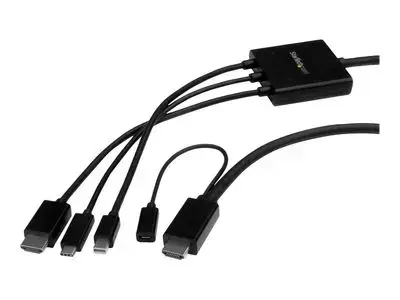
Connect your USB Type-C, HDMI or Mini DisplayPort laptop to an HDMI display or projector. This unique adapter cable lets you connect almost any laptop or desktop computer to an HDMI display or projector. It supports the USB-C , HDMI and Mini DisplayPort output from your computer, and video resolutions up to Ultra HD 4K. The adapter is compatible with your DP alt mode computer. DP alt mode means your computer can pass a DisplayPort video signal through the USB-C port. Simple boardroom setup This adapter cable is ideal for your boardroom's HDMI display or projector. You can reduce clutter and eliminate the need for multiple adapters on your boardroom table by providing a single adapter cable that can support a variety of signals. One adapter for multiple users The adapter cable supports multiple input signal types, so you'll be able to accommodate a variety of user needs. Employees and guests can plug in their USB Type-C , HDMI or mDP laptops and deliver their presentations using your boardroom's HDMI display, without having to carry their own adapters. Astonishing picture quality This adapter cable ensures you can maintain an astonishing picture quality with four times the resolution of 1080p. The adapter is also backward compatible with lower resolution displays and video sources. With support for high-definition resolutions of 1080p and 720p, you can future-proof your existing setup for 4K video. USB-powered The adapter can be powered through the provided Micro-USB cable by connecting the cable from the adapter to a USB port on your laptop or the HDMI display. You can connect your laptop to either input on the adapter cable, and share presentations. The CMDPHD2HD is backed by a 3-year StarTech.com warranty and free lifetime technical support. Note: Your USB-C equipped device must support video to work with this adapter.
Cookie Settings
You can choose which types of cookies we are allowed to use. Necessary cookies are always active.
For more information about the cookies used, see the Cookie Policy.
Cookie Settings
You can choose which types of cookies we are allowed to use. Necessary cookies are always active.
For more information about the cookies used, see the Cookie Policy.
Necessary
Required for the website to function. These cannot be disabled, so user consent is not required.
Analytics
Help improve website performance by tracking visits and traffic sources. If declined, your visit will not be included in our analytics.
Marketing
Help provide you with personalized information about our products and services. If declined, you will not receive personalized content.
Functional
Enable additional features and personalization, such as remembering your preferences. If declined, some functionality may be unavailable.